
How to use Triggers to turn simple song ideas into rich lyrics
By Will Hicks
When starting a new song, most writers make the same mistake: they jump straight into forcing direct rhymes.
You have a core theme or title idea, but as soon as you search for exact phonetic rhymes, your creative universe shrinks. You end up picking words simply because they end with the same sound, rather than because they build a world for your listener.
This is where Triggers comes in. Instead of giving you literal definitions or strict rhymes, Triggers generates a conceptual palette of related imagery, settings, actions, and objects.
Think of Triggers as dynamic mind-mapping built specifically for your lyric sheet.
What is Triggers (and how does it differ from a Thesaurus)?
A standard thesaurus gives you synonyms—words that mean the exact same thing. If you search "Ocean", a thesaurus might give you "Sea" or "Main". That doesn't give you much room to expand your story.
Triggers works associationally. It asks: What imagery, physical objects, atmospheric conditions, and settings naturally exist in the same universe as this word?
When you search a root word in Triggers, Chorus returns a rich list of contextual words that help you build concrete scenes rather than vague abstractions.
Practical Example: Building a song around "Ocean"
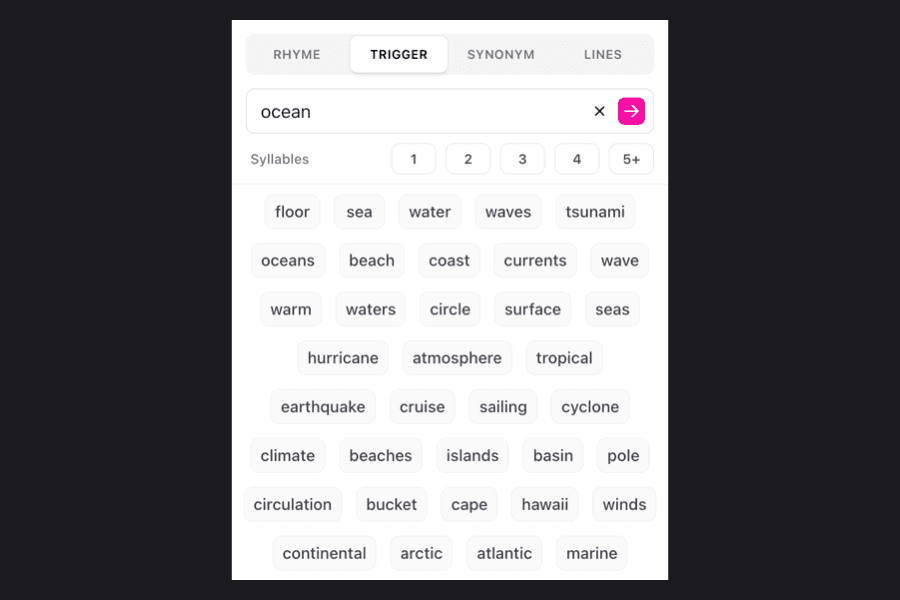
Let's look at what actually happens when you feed "ocean" into Triggers in Chorus. Here is a real slice of the raw data generated by the engine:
floor, waves, tsunami, currents, surface, hurricane, depths, voyage, liner, reef, seafaring, vessels, shallow, depth, expanse, seabed
Notice how these aren't just definitions? They span movement, scale, danger, and tangible objects.
Here is how you can group that exact output into a functional lyric-writing palette:
The "Ocean" Word Palette
Motion & Action: currents, waves, voyage, seafaring, shallow
Scale & Tension: tsunami, hurricane, expanse, depths, floor
Tangible Settings: liner, vessels, reef, seabed, surface
3 ways to use Triggers in your writing workflow
Strategy 1: Build a word bank before writing line 1
Before writing a single lyric line, run your core concept through Triggers. Drop 10–15 generated words straight into your Notepad panel in Chorus.
Having this word bank sitting beside your lyric sheet keeps you from running out of steam halfway through your first verse.
Strategy 2: Break through the "Tricky Second Verse"
Verse one is usually easy because you're using your initial idea. Verse two is where momentum often stalls.
To break the wall, take a secondary object or setting from verse one and feed it back into Triggers to unlock a completely new angle.
Strategy 3: Hover-search directly on your lyric sheet
You don't need to break your flow to open the dictionary panel. While typing on your lyric sheet in Chorus, hover over any word to instantly reveal a popup with its top rhymes and related trigger words.
From Triggers to finished lyric: A quick transformation
Here is how a basic, cliché lyric transforms into a visual line using the actual "ocean" Triggers output:
Without Triggers (Cliché):
"Looking at the ocean, feeling so lost in my emotion."Selected Triggers from Chorus:
shallow, sea, currentsWith Triggers (Evocative):
"At the edge of the shallow sea/I still feel the currents pulling me"
By giving you the surrounding universe of your topic, Triggers helps you write lyrics that feel visual, distinct, and grounded in real imagery.