
Mastering the Chord Pads: From Basic Progressions to Harmonic Tension
By Will Hicks
Finding the right chord progression shouldn't require a degree in music theory. The Chords Panel in Chorus is designed to give you instant access to rich harmonic options. It's also designed to help you learn, starting with basic chord pads with more advanced options for more experienced writers.
Here is how to get the most out of the Chord Pads interface to craft memorable, emotionally compelling songs.
Visualizing Harmonic Tension: The Color-Coded System
Every chord in a key serves a specific emotional and functional role in a progression. To help you build and resolve tension intuitively without overthinking the theory, Chorus uses a subtle color-coding system on each chord pad:
- 🔴 Tonic (I, iii, vi) – Home base. Feels stable, resolved, and grounded.
- 🟡 Predominant (IV, ii) – Moving away from home. Adds energy and sets up the release.
- 🟢 Dominant (V) – Peak tension. Pulls heavily back toward the red Tonic.
- 🟣 Borrowed (♭III, ♭VI, ♭VII) – Modal interchange. Adds drama, nostalgia, or cinematic flavor.
If you want to hear why those colors pull the way they do, Basic music theory for songwriters walks through the same ideas with playable examples.
It's very common for progressions to start at home, move away, then come back home. You can follow this formula by playing any 🔴 chords, then move to the 🟡 chords, then finally to the 🟢 chords.
Writing Tip: A classic way to start a sequence with momentum is to start on the 🟡 chord - it immediately adds energy and sets up the release. This is commonly seen in prechorus or bridge sections.
Choosing Your Layout: Simple vs. Extended Pads
Depending on where you are in your writing process, you can toggle between two primary chord pad views.
1. Simple View (Basic chords and approach chords)
The Simple View keeps your options focused so you can lay down a foundation quickly without getting overwhelmed:
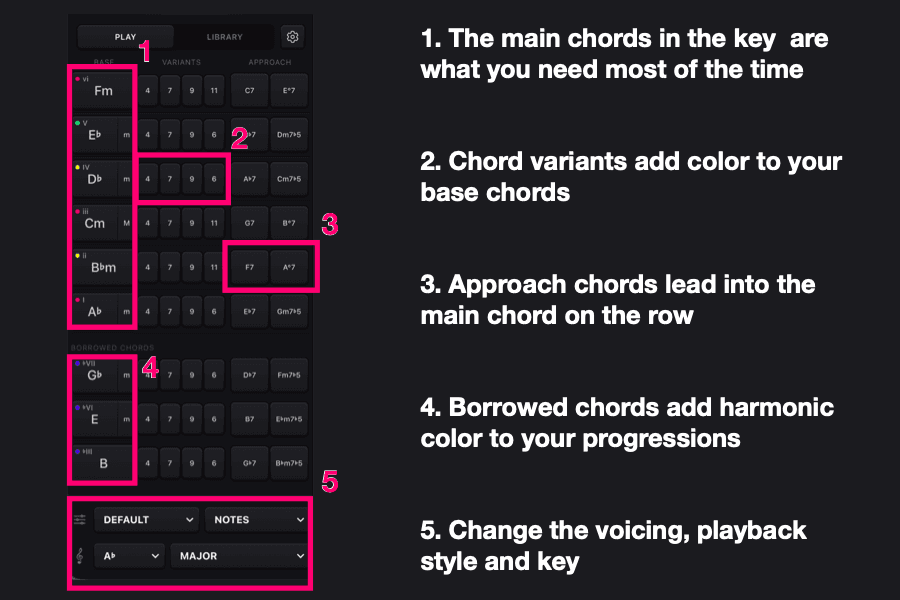
- Primary Chords: Instant access to the primary chords of your chosen key.
- Borrowed Chords: A curated selection of modal interchange chords for quick color changes.
- Approach Chords: Every chord pad includes an approach chord (the fifth above the chord, known as the secondary dominant). Playing an approach chord right before your main target chord creates a feel like you're being pulled to the destination chord.
2. Complex View (Extensions, Parallel Minors & Advanced Approaches)
When you're ready to add nuance, flavor, and jazz-influenced voicings, switch to the Complex View:
- Harmonic Extensions: Dedicated options for sus4, 7th, 9th, and 11th variations on every root pad.
- Secondary Approach Chords: A second layer of approach options to craft chromatic, step-wise basslines.
- Parallel Minors: Instant access to chords from the parallel minor key to bring darker, richer textures into your bridge or verse.
Interactive Workflow: Auditioning & Drag-and-Drop
Chorus connects your harmonic choices directly to your lyric sheet and virtual instruments:
- Instant Visual Feedback: Hovering over any chord pad highlights the exact note spellings across the interactive piano keyboard at the bottom of the screen. This makes it easy to learn the voicings or double the line on a MIDI controller.
- Play the Chord: Click on the chord pad to play the chord, using one of the various voicings and playback styles in Chorus.
- Seamless Drag-and-Drop: Once you find a chord or sequence that fits your vocal melody, simply drag the pad directly onto your Lyric Sheet.